Transfer WhatsApp Chat History Between iOS and Android Using a QR Code. WhatsApp, one of the world’s most popular messaging platforms, has introduced a revolutionary feature that simplifies transferring chat history between iOS and Android. The new QR code transfer feature allows users to seamlessly migrate their conversations and media from one operating system to another without relying on cloud backups. This comprehensive guide explores the step-by-step process of transferring WhatsApp chat history using QR codes.
Understanding the WhatsApp QR Code Transfer Feature
WhatsApp’s QR code transfer feature provides a secure and efficient transfer of chat history directly between devices. Users can initiate the transfer process by scanning a QR code, ensuring a seamless transition to a new device. This innovative approach eliminates the need for cloud backups, simplifying the process and reducing storage limitations.
Step-by-Step Guide: Transferring WhatsApp Chat History
To transfer your WhatsApp chat history between iOS and Android devices, follow these simple steps:
- Preparing the Source Device (Old Device)
– Launch WhatsApp on your current device.
– Access the “Settings” menu within WhatsApp.
– Look for the “Chats” option and select it.
– Locate the “Chat History” or “Chat Backup” section.
– Initiate the process to create a backup of your chat history. This step will ensure that your data is ready for transfer.
- Initiating the Transfer Process
– On your new device, install WhatsApp if you haven’t already.
– Open WhatsApp and proceed with the initial setup process.
– During setup, you will encounter an option to transfer your chat history.
– Instead of using cloud backups, select the “Transfer Chat History” or similar option.
– A QR code will be displayed on your new device’s screen, ready to receive the chat history.
- Scanning the QR Code
– Take your old device (the source device) and open WhatsApp.
– Access the “Settings” menu within WhatsApp on the old device.
– Navigate to the “Chats” section.
– Look for the option to transfer chats to a new device or scan a QR code.
– Select the appropriate option and scan the QR code displayed on the new device.

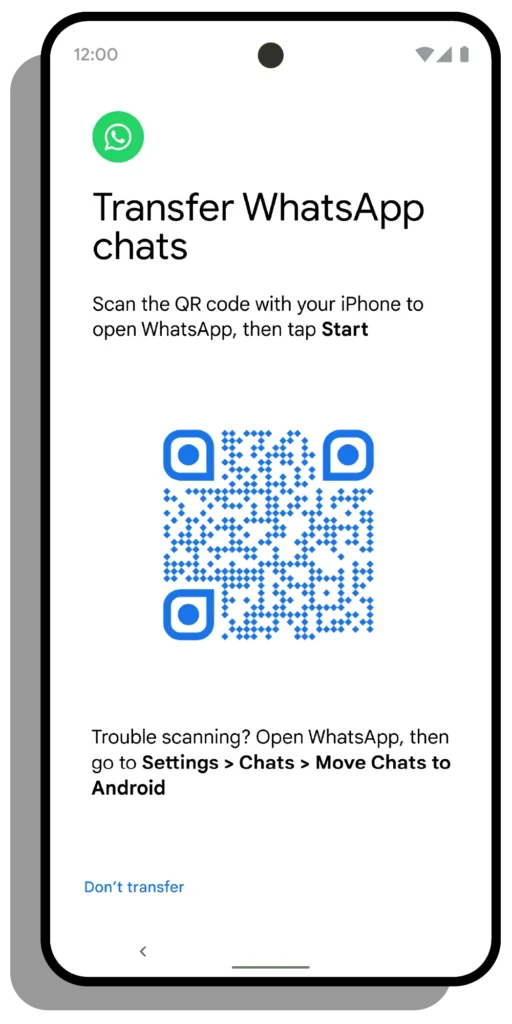
Photo:
The Keyword
- Completing the Transfer
– The transfer process will commence once the QR code is successfully scanned.
– Your chat history, including conversations, media files, and attachments, will be securely transferred from the old device to the new device.
– The transfer process duration may vary based on the size of your chat history.
- Verifying the Transfer
– Verify that all your chat history has been successfully migrated to the new device after the transfer.
– Open WhatsApp on the new device and navigate to the “Chats” section.
– You should find all your conversations, media files, and attachments intact, ensuring a seamless transition between iOS and Android.
Embracing the Simplicity of WhatsApp QR Code Transfer
WhatsApp’s QR code transfer feature represents a significant leap forward in simplifying transferring chat history between iOS and Android devices. Users can now effortlessly switch between operating systems without compromising their valuable conversations and media by eliminating the dependency on cloud backups.
By following these straightforward instructions, you can effortlessly transfer your WhatsApp chat history between iOS and Android devices, leveraging the power of QR codes and ensuring a seamless transition. Embrace the simplicity and convenience of WhatsApp’s innovative QR code transfer feature to continue your conversations seamlessly across different operating systems.