
Adding a second monitor is a popular way to improve productivity, but buying another display may not be necessary if you already own a laptop. With the right desk arrangement, your laptop can serve as a convenient secondary screen without taking up the space or money required for an additional monitor.
After rebuilding his workspace following a move, Engadget’s Adnan Ahmed discovered that pairing a single 27-inch external monitor with his laptop offered a practical alternative to a traditional dual-monitor setup.
Turn Your Laptop Into a Second Screen
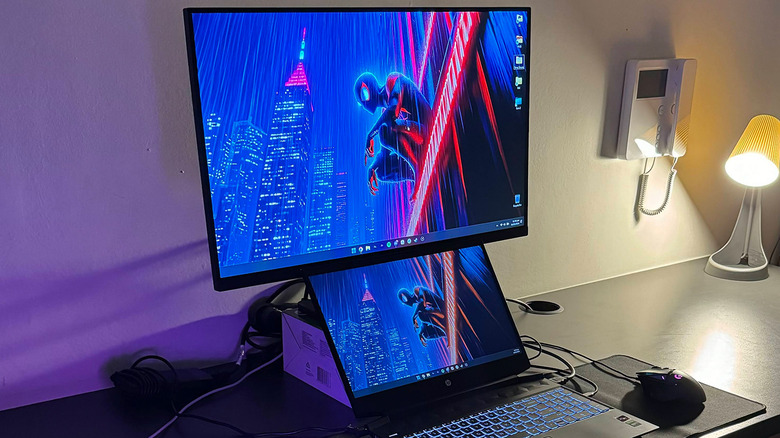
Rather than closing his laptop and relying entirely on an external display, Ahmed began using the laptop screen for secondary tasks. This allowed him to keep important applications visible while using the larger monitor for his primary work.
Positioning the laptop can make a significant difference. Although a laptop stand can raise the screen to the same height as an external monitor, the smaller display may be harder to see when sitting at a comfortable distance from a 24- or 27-inch monitor.
Ahmed found that placing the laptop directly beneath the external monitor worked better. This arrangement kept both screens accessible while preserving the laptop’s built-in keyboard and trackpad. It also provided a ready-made webcam for video calls, eliminating the need to purchase a separate one.
The difference in screen size and resolution may take some getting used to, but it is less noticeable when the laptop is used for secondary applications such as Spotify, Slack or YouTube.
For compatible laptops, USB-C can make the setup even simpler by supporting display output and charging through a single connection, potentially with the help of a docking station.

When One Large Monitor Makes More Sense
A dual-monitor arrangement is useful for multitasking, but it is not essential for everyone. Multiple external displays can create cable clutter, occupy valuable desk space and require additional power outlets.
For users who prefer a simpler setup, a single larger monitor may offer a better balance between workspace and productivity.
After experimenting with different dual-monitor configurations, Ahmed returned to using one 32-inch curved display with a 1440p resolution. Although the monitor occupied a substantial portion of his desk, it provided enough room to keep multiple windows open without the extra complexity of managing another external screen.
However, he believes a 4K display would have been a better choice at that size. For anyone considering a monitor larger than 27 inches, moving to 4K is worth considering for a sharper image.
A Cleaner Desk and a More Immersive Experience
A large monitor offers more than additional screen space. It can reduce the need for third-party window-management tools and avoid the central bezel that separates two displays in a conventional dual-monitor arrangement.
For gaming enthusiasts, a large curved screen can also create a more immersive experience by filling more of the user’s field of view.
One further recommendation is to use a monitor arm. Compared with relying on a monitor’s built-in stand, an arm provides greater flexibility for adjusting screen height, tilt and positioning, helping users create a more comfortable workspace.
Which Setup Should You Choose?
The best arrangement depends on your available space and how you work.
- Use your laptop as a second screen if you want to save money, keep secondary apps visible and avoid buying another monitor.
- Choose two external monitors if your workflow involves several applications that need to remain visible simultaneously.
- Consider one large monitor if you prefer a cleaner desk, fewer cables and enough room to manage multiple windows on a single display.
Ultimately, a more productive workspace does not necessarily require more hardware. A laptop you already own can provide useful extra screen space, while a single large monitor may be the better option for those who value simplicity and immersion.