





























Batteries. They’re not typically thought of as a significant source of innovation. Most companies have spent the last few years removing mice in favor of more lightweight designs.
That’s what’s made the return of the replaceable and rechargeable battery surprising—something I once thought to be a lost technology from a bygone era. A few companies have recently realized that the ability to pop out and replace your battery in seconds is a great way to extend mouse life without needing to increase battery size or efficiency.
From the handful of mice I’ve tested with hot-swappable batteries so far, Wallhack does it best. The mouse is designed around the function’s ease of use, and everything else comes together to make a mouse that feels not only competitive for gaming, but also well thought-out and satisfying to use in everyday life.

The Wallhack M-001 is a premium gaming mouse that proves great hardware is about more than numbers on a spec sheet. With its magnesium-alloy shell, replaceable rechargeable batteries, and an unusually sophisticated wireless dongle, it delivers a tactile, thoughtfully engineered experience that makes everyday gaming more enjoyable.
Priced at $190, it isn’t the cheapest option for gamers chasing top-tier specifications. But its clever design and satisfying physical controls make it stand out in a crowded market.
RATING
9/10
PRICE
$190
What stands out
-
Lightweight magnesium construction
-
Rechargeable, hot-swappable batteries
-
Customizable dongle with physical DPI and polling-rate dials
-
Up to 8,000 Hz polling and 25,600 DPI
-
Straightforward browser-based configuration software
What could be better
-
Expensive compared with some competing mice
-
Sensor technology is no longer cutting-edge
-
No Bluetooth or USB-C port on the mouse itself
1. A Shape Designed for Control

The M-001 uses a largely symmetrical design intended for right-handed users. It features two primary buttons, two thumb buttons, a ratcheting scroll wheel, and an underside power switch.
Measuring 120 mm long, it is slightly shorter than some competitors, including the Razer Viper V4 Pro and Logitech Pro Superstrike X2. Its most distinctive ergonomic feature is its profile: a lower front and a more pronounced rear hump create a forward-leaning angle for the hand.
That geometry encourages the palm to sit higher while the fingers point downward. The reviewer found this arrangement particularly effective for quick movements, although comfort ultimately depends on personal preference and grip style.
The main buttons have subtle contours to help the fingers rest naturally, while the tapered lower section makes lifting and repositioning the mouse easier. The side buttons are positioned within comfortable thumb reach without interfering with the grip.
One minor drawback is the elevated scroll wheel. It may feel unusual at first for users accustomed to lower-profile designs, though the reviewer adapted after a few hours.
2. Magnesium Construction Without Excess Weight

The mouse’s magnesium shell is one of its defining features. Unlike the plastic construction found on many gaming mice, the metal body feels rigid, solid, and cool to the touch.
At approximately 53.6 grams, the M-001 remains lightweight despite its full metal exterior. It is slightly heavier than the 50.3-gram Razer Viper V4 Pro and considerably heavier than some ultra-lightweight alternatives, but it compensates with a more substantial feel.
The solid upper shell also avoids the holes and cutouts used in some lightweight designs. That makes it more comfortable for different grip styles and less likely to accumulate dust and debris inside the body.
Its finish is another highlight. Rather than appearing completely black, the tested unit has a gunmetal-gray look with metallic flecks that give it a distinctive appearance.
The underside is equally unconventional. Instead of a complete bottom shell, a thin perimeter frame supports six mouse feet, leaving much of the circuit board and battery visible. The PCB also serves as a structural component, helping reduce weight while maintaining rigidity.
It’s an unusual design choice, but one that adds to the M-001’s appeal for anyone who appreciates clever engineering.
3. A Hot-Swappable Battery System That Gets It Right

The M-001’s replaceable battery system is arguably its most innovative feature.
Rather than relying on magnets or a rotating lock, Wallhack uses a spring-loaded ejector mechanism similar to the way an SD card or Nintendo Switch cartridge clicks into place. Push the battery until it clicks, and it locks securely. Press it again, and it pops out for removal.
The process is quick, intuitive, and surprisingly satisfying.
Keeping a spare battery charged in the dongle means users can swap batteries and get straight back to gaming without waiting for the mouse to recharge. In practice, this can dramatically reduce downtime and extend the device’s useful life.
There is, however, a trade-off: the mouse has no USB-C port. It operates wirelessly through its dedicated 2.4-GHz receiver and cannot be plugged directly into a computer or charged through a cable.
That may not matter to users who keep a charged spare battery ready. But if the battery runs flat and the spare is unavailable—or the dongle stops working—there is no alternative wired connection.
4. The Dongle Is More Than an Accessory

Gaming mouse receivers are often small, lightweight accessories that do little beyond maintaining a connection. Wallhack takes a very different approach.
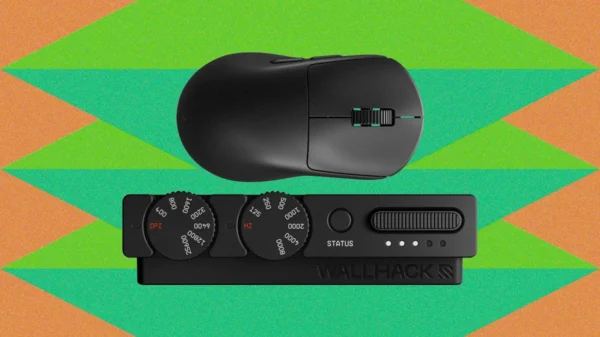
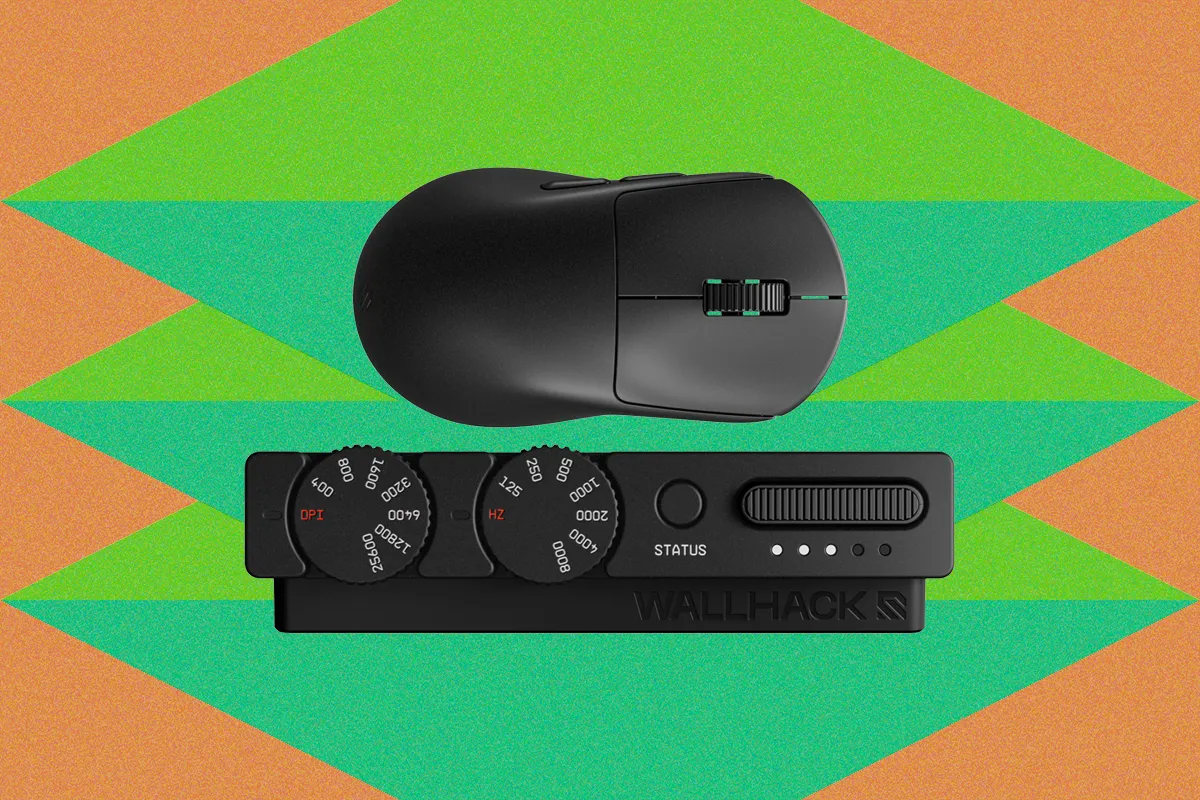
The M-001’s receiver is a substantial metal wedge finished to match the mouse. It features two rotary dials, a button, LED indicators, and a slot for charging a spare battery.
The first dial adjusts DPI from 400 to 25,600, while the second controls polling rates from 125 Hz to 8,000 Hz.
Both dials use a tactile ratcheting mechanism. They are firm enough to resist accidental adjustments but smooth enough to operate with one finger. LEDs illuminate to indicate when settings change.

The physical controls proved more useful than the reviewer initially expected. Adjusting DPI on the fly helped accommodate different characters and play styles in Marvel Rivals. Changing the polling rate was also helpful when older games, such as Destiny 2, behaved poorly at rates above 1,000 Hz.
The dongle transforms a typically forgettable accessory into a functional part of the gaming experience—and doubles as a convenient charging station for the spare battery.
5. Simple Software With Extensive Customization

Wallhack Terminal, the M-001’s browser-based configuration tool, uses a minimalist black-and-white interface that resembles a command-line terminal more than conventional gaming software.
The stripped-back aesthetic is refreshing, but the software is not lacking in functionality. Users can adjust mouse rotation, acceleration, and lift-off distance, with the latter configurable in millimeters rather than vague presets such as low, medium, or high.
The software also allows the sensor to scan at a rate higher than the mouse’s maximum 8,000-Hz polling rate. This may improve tracking accuracy in some situations, although doing so can reduce battery life.
The dongle’s dials provide quick adjustments, while the software offers more precise control when users want to fine-tune their settings.
6. Reliable Performance, Even Without the Latest Sensor

Inside the M-001 is a PixArt PAW3950 sensor, also associated with the Razer Focus Pro 30K branding used in the Razer Viper V2 Pro.
Although this sensor is older than the newest options on the market, the reviewer found it reliable and capable of tracking rapid movements and directional changes during intense gameplay.
The mouse’s primary buttons use Omron optical switches, while the side buttons use low-profile Omron mechanical switches. Its scroll wheel also relies on a mechanical encoder rather than an optical alternative. Mechanical encoders may not offer the same longevity as some optical designs, but they can be easier to repair or replace.
The internal construction is designed with serviceability in mind. Removing four screws beneath the outer mouse feet allows the lower shell to come away without fragile plastic clips, making the internal components easier to access.
For buyers who value longevity and repairability, this is a meaningful advantage.
7. Is the Wallhack M-001 Worth $190?

The Wallhack M-001 is not necessarily the best choice for shoppers who want the newest sensor technology or the lightest possible mouse at the lowest price.
Its sensor is capable rather than class-leading, and the absence of Bluetooth and wired USB-C connectivity limits flexibility. Competitive players focused exclusively on technical specifications may find better value elsewhere.
But the M-001 excels in areas that specifications alone cannot capture. Its magnesium shell feels premium, its shape supports quick and controlled movements, its battery mechanism is exceptionally convenient, and its adjustable dongle makes customization genuinely enjoyable.
The result is a gaming mouse that feels carefully designed rather than assembled around a list of features. Its 8,000-Hz polling rate and 25,600-DPI maximum should be sufficient for all but the most demanding competitive players.
The verdict: At $190, the Wallhack M-001 is a premium mouse for people who care about the experience of using their gear as much as raw performance. Its thoughtful engineering, replaceable batteries, and tactile controls make it one of the more enjoyable gaming mice to use—even if it isn’t the undisputed technical leader.